

---
title: Long-term memory for your agents
type: playbook
for: [agent builders]
---

Long-term memory for your agents

Memory you can read, that any agent can use.

Built-in agent memory handles the working session: the thread you're on, the model of your workflow the agent has been building for weeks. Basic Memory is the layer underneath. A knowledge graph the agent reads and writes, owned by you, portable across vendors. Hermes users in the wild are investing hundreds of hours building custom memory kernels. We did that work, and we shipped it as plain Markdown.

## The problem

Agents have no real long-term memory.

Built-in memory locks to one vendor and is usually a digest you can't fully inspect. Vector stores are opaque. A folder of files can't be queried. Switch agents and you start over. Build your own and it's 200-400 hours of plumbing before you write a single useful note.

## How it works in Basic Memory

The workflow.

  1. 1Install the Basic Memory plugin for your agent (Hermes, OpenClaw, Codex, Claude Desktop), or connect any MCP-compatible client. One command in most cases.
  2. 2The agent gets a curated set of Basic Memory tools: search the graph by meaning or keyword, read and write notes, build context from a memory:// URL, validate against schemas. Plus per-turn auto-capture and end-of-session summaries.
  3. 3The agent searches before answering. When you ask about prior work, it queries Basic Memory first; built-in memory carries the working context, Basic Memory carries the long-term record. Both run on the same turn.
  4. 4Same graph works for the next agent. Plain Markdown survives a vendor switch. Hermes today, Codex tomorrow, whatever ships next year.

## What you get

The outcome.

Long-term memory your agent owns, queries, and updates. Plain Markdown that survives a vendor change, with a tool surface that lets the agent recall by meaning rather than rifling through transcripts. Built-in memory still handles the working session. Basic Memory holds everything that should outlast it.

## In practice

What the Hermes integration ships.

Both the Hermes and OpenClaw plugins are public in the basic-memory repo. Here's what installing the Hermes plugin actually gives the agent: a one-line install, ten tools curated from Basic Memory's MCP surface, and a behavioral guide that tells the agent how to use them. OpenClaw is structured the same way and ships ten bundled memory skills on top.

Install (Hermes)view source

One command to install, one config line to activate. The plugin self-installs the bm CLI on first init (one-time ~10s) and works in local mode by default. A single CLI flip switches to true cloud routing through Basic Memory Cloud.

# Install the plugin
hermes plugins install basicmachines-co/basic-memory \
  --path integrations/hermes

# Activate in ~/.hermes/config.yaml
memory:
  provider: basic-memory

# Verify
hermes memory status
#   Provider:  basic-memory
#   Plugin:    installed ✓
#   Status:    available ✓
What the agent gets: the bm_* tools

Ten tools curated from the full Basic Memory MCP surface. The agent gets the operations that matter for long-term memory: search by meaning, read by permalink, capture decisions, navigate the graph, list projects across workspaces. Every read/write tool takes optional project/project_id for cross-project routing without reconfiguring the plugin.

bm_search       semantic + full-text search (call this before answering)
bm_read         fetch a note by title, permalink, or memory:// URL
bm_write        create a new note (decisions, meetings, insights)
bm_edit         append / prepend / find-replace / replace-section
bm_context      navigate via memory:// URLs to find related notes
bm_delete       delete a note
bm_move         move a note to a different folder
bm_recent       notes touched recently ("yesterday", "2 weeks", "7d")
bm_projects     list available projects with their UUIDs
bm_workspaces   list Basic Memory Cloud workspaces

Plus automatic capture:
  per turn       every exchange appends to a session-transcript note
  end of session a separate summary note, linked via summary_of
skill/SKILL.md (excerpt)view source

The bundled skill teaches the agent how to behave. The instruction set is small and opinionated: search before answering, offer to capture, suggest connections, don't over-capture. The full skill ships with the plugin and is loaded into the agent's system prompt automatically.

# Basic Memory Knowledge Graph

You have access to a persistent knowledge graph backed by Basic
Memory. The graph survives across sessions and is shared with
other tools (Claude Desktop, Obsidian, the bm CLI).

## When to use each tool

| Situation                                          | Tool                       |
|----------------------------------------------------|----------------------------|
| User asks about a topic that might be documented   | bm_search → bm_read        |
| User exposes a decision or meeting outcome         | offer to bm_write          |
| Updating prior work                                | bm_edit                    |
| Exploring related concepts                         | bm_context                 |
| "What was I working on yesterday?"                 | bm_recent                  |

## Behavior guidelines

1. Search before answering. If the user asks "what did we decide
   about X?", run bm_search first.
2. Offer to capture. When the user shares decisions or meeting
   outcomes, ask: "Should I save this as a note?"
3. Suggest connections. When a search returns related notes, surface
   them so the user knows what already exists.
4. Don't over-capture. Auto-capture is already running per turn.
5. Sensitive info. Don't capture credentials or personal data
   without confirmation.
OpenClaw ships ten bundled memory skillsview source

The OpenClaw plugin is structured the same way (install via npm, agent tool surface, slash commands) and additionally ships a set of bundled skills. The agent doesn't just have tools. It has named workflows for the recurring memory operations.

memory-defrag             cleanup and reorganization of memory files
memory-ingest             import existing material into Basic Memory
memory-lifecycle          manage note/project lifecycle workflows
memory-literary-analysis  analyze texts and reading notes
memory-metadata-search    query notes by frontmatter fields
memory-notes              guidance for writing well-structured notes
memory-reflect            periodic consolidation into durable memory
memory-research           research synthesis into durable notes
memory-schema             schema lifecycle (infer, create, validate, diff)
memory-tasks              structured task tracking that survives compaction
What an agent's memory looks like in the cloud web app

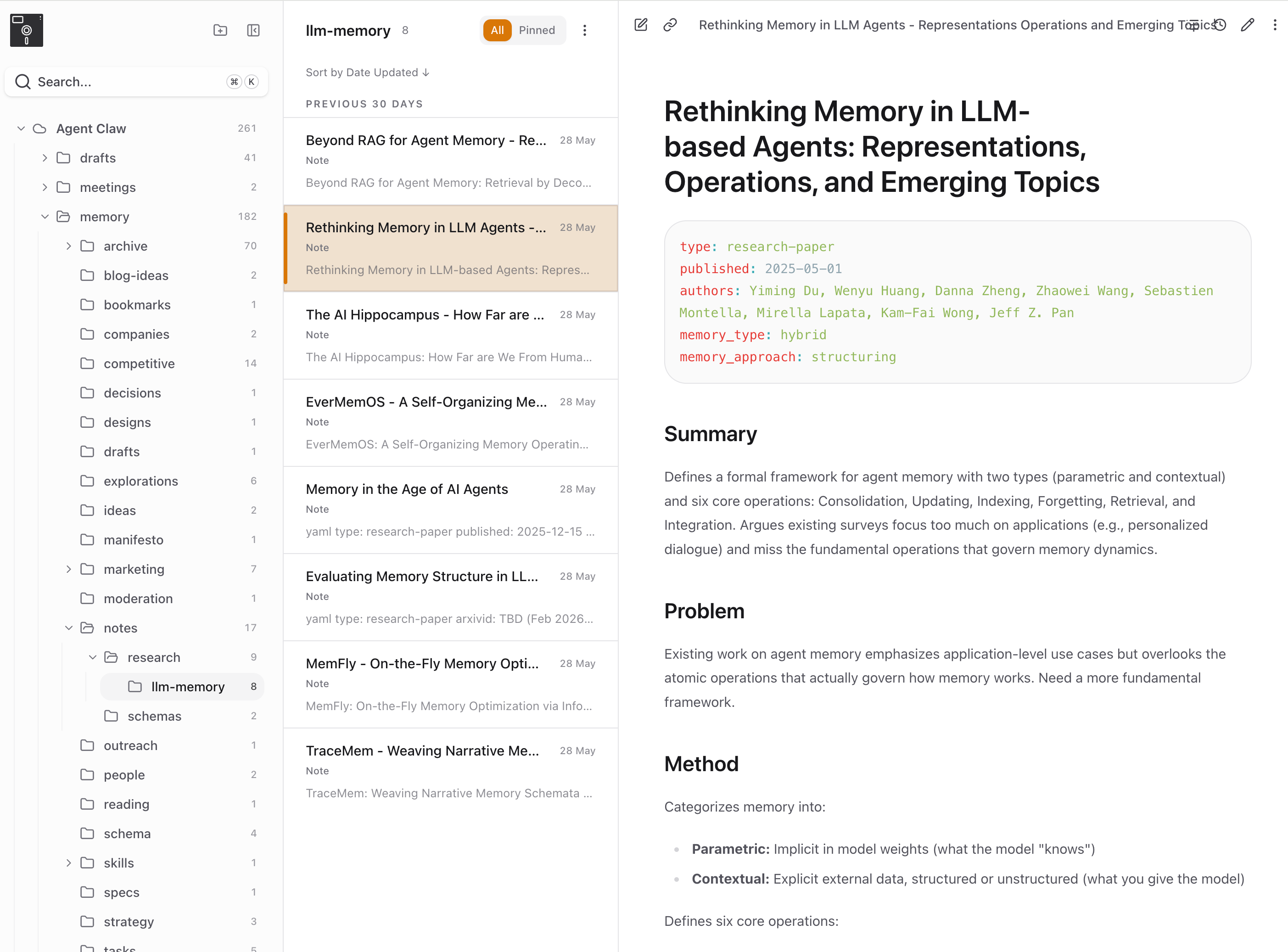
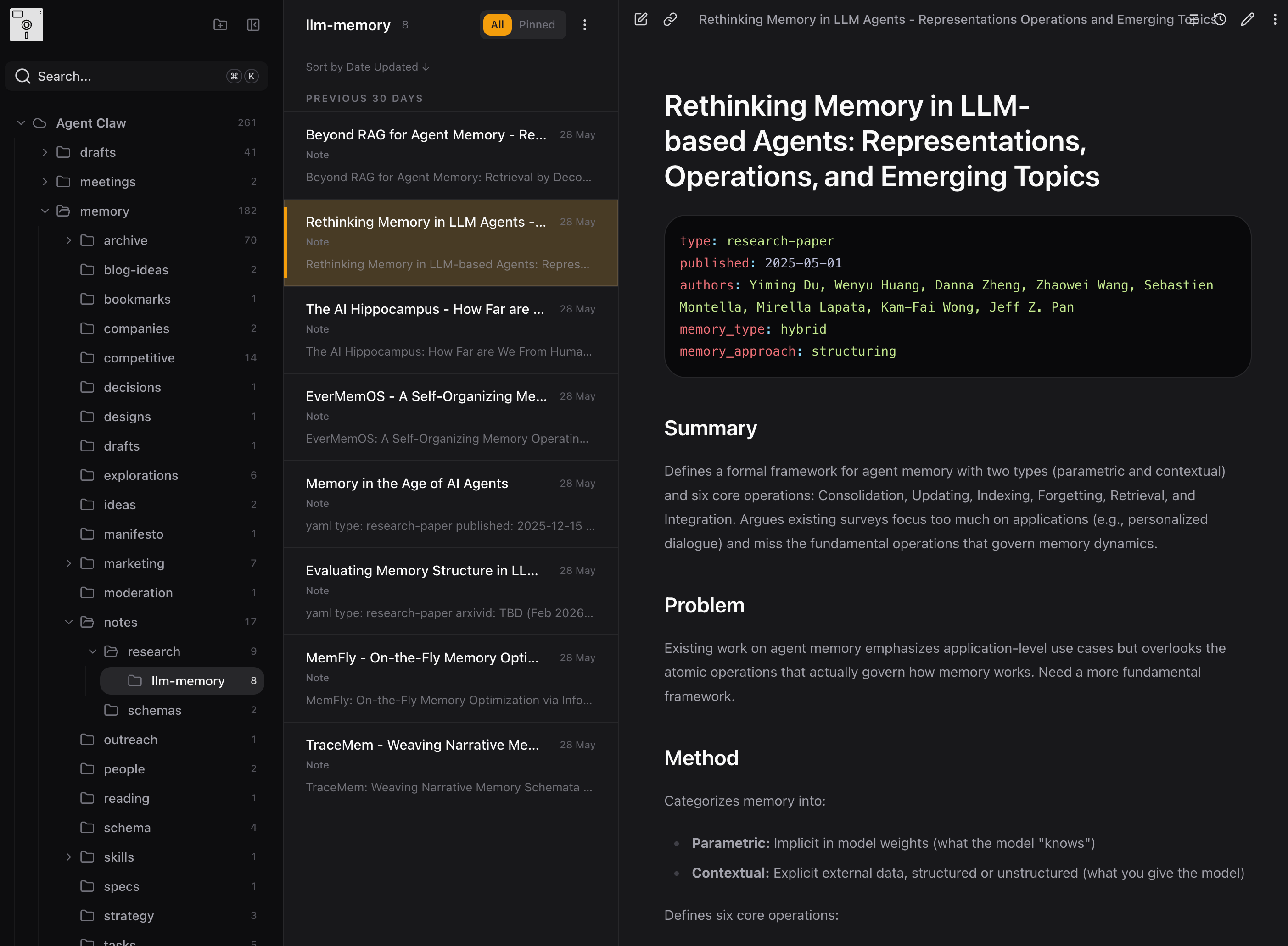
Here's an OpenClaw agent working through memory-research papers, captured live in Basic Memory Cloud. Each paper gets a structured note (type: research-paper, with summary, problem, method, observations). The sidebar shows the agent's growing corpus organized into folders. Click into any note and you can read, edit, correct, or extend what the agent wrote. The agent owns the writes; you own the file.

Basic Memory Cloud web app showing an OpenClaw agent's research notes on memory papers, with a folder tree on the left, a list of papers in the middle, and the open paper note on the right showing structured frontmatter and Summary, Problem, and Method sections
What it unlocks

The accumulation is the value

Agents that have been reading and writing the same knowledge graph for weeks end up knowing things. The codebase, the decisions, the patterns. More than any single chat can hold. The accumulation is the value, and the format is the proof. Plain Markdown survives a vendor switch. Your agent's memory follows you.

We see this every day on Basic Memory itself. The CI agent in the public repo has been compounding a PR-by-PR memory across hundreds of merges: readable, queryable, and shared with every other agent we connect.

## FAQ

Common questions.

What's the best long-term memory for an AI agent?
Agents need memory they can write to, query by meaning, and that survives a vendor change. Basic Memory ships public integrations for Hermes and OpenClaw with the same set of tools (search, read, write, edit, build-context, schema-validate), all backed by plain Markdown you own. Built-in agent memory still handles the working session; Basic Memory is the long-term layer underneath.
How does Basic Memory work alongside Hermes's built-in memory?
Hermes's built-in memory keeps the agent's working context: your active thread, your preferences, the workflow it's been adapting to. Basic Memory is the long-term knowledge graph the agent reads and writes alongside it. When you ask a question, the agent searches Basic Memory first (search-before-answer), captures decisions per turn, and writes an end-of-session summary. Nothing replaces. Both run on the same turn.
Why not use raw logs or a vector store for agent memory?
Raw logs are cheap but hard to recall from. A vector store is opaque: you can't read or edit what the agent knows. Basic Memory keeps memory as readable Markdown with a real index on top (full-text, semantic, and a knowledge graph), so recall works, the memory stays inspectable, and the same knowledge graph is portable across any MCP-compatible agent.

Try this playbook.

Free and open source to run locally. Two minutes to connect your first AI tool.